Quick Answer
If you’re spending 8+ hours a day sitting, your chair matters more than you think. The best office chairs in 2026 balance ergonomic support, adjustability, and durability without breaking the bank. For most people, the Herman Miller Aeron remains the gold standard, but we’ve also tested budget options like the Autonomous Kinn and specialized picks for gaming, small spaces, and back pain relief. Read on to find your perfect match.
—
What to Look for in an Office Chair
Before we dive into specific models, let’s talk about what actually makes a good office chair—because there’s a lot of marketing noise out there.
Lumbar Support
This is non-negotiable. Your lower back has a natural curve (lordosis), and your chair should support that curve, not flatten it. Look for:
– Adjustable lumbar support (the best chairs let you move it up/down and in/out)
– Firm but not hard cushioning in the lumbar region
– Lumbar height that aligns with your lower spine when seated
Without proper lumbar support, you’ll feel back pain within a few hours—and it gets worse over days and weeks.
Seat Depth and Width
Your seat should:
– Allow 2-3 inches of space between the edge and the back of your knees
– Be wide enough that your hips don’t touch the sides
– Have a slight waterfall edge (curved front) to reduce pressure on your thighs
Too deep? Your back won’t touch the backrest. Too shallow? You’ll feel unsupported.
Armrests
Quality matters here:
– Adjustable height (at least 1-2 inches of movement)
– Adjustable width (so your arms aren’t splayed or cramped)
– Padded but firm (soft padding compresses and becomes useless within months)
– Angle adjustment (3D armrests allow you to rotate them)
Fixed armrests are a deal-breaker if you have any shoulder or neck tension.
Seat Material
In 2026, you have three main options:
| Material | Best For | Downsides |
| Mesh | Hot climates, breathability, easy cleaning | Can feel less supportive; not as durable long-term |
| Fabric | Comfort, softness, variety of colors | Absorbs sweat and odors; harder to clean |
| Leather/Synthetic | Durability, professional look, easy cleaning | Can get hot; cracks over time |
Recline and Tilt Lock
You should be able to:
– Recline 15-25 degrees without feeling unstable
– Lock the tilt at your preferred angle
– Control recline tension so it’s smooth, not jerky
A chair that can’t recline feels stiff and restricts blood flow during long sits.
Height Adjustment Range
Your feet should rest flat on the floor with your thighs parallel to the ground. Check that the chair’s height range fits:
– Standard range: 17-21 inches (for people 5’4″ to 6′)
– Tall/short variants: Look for extended ranges if you’re outside that range
—
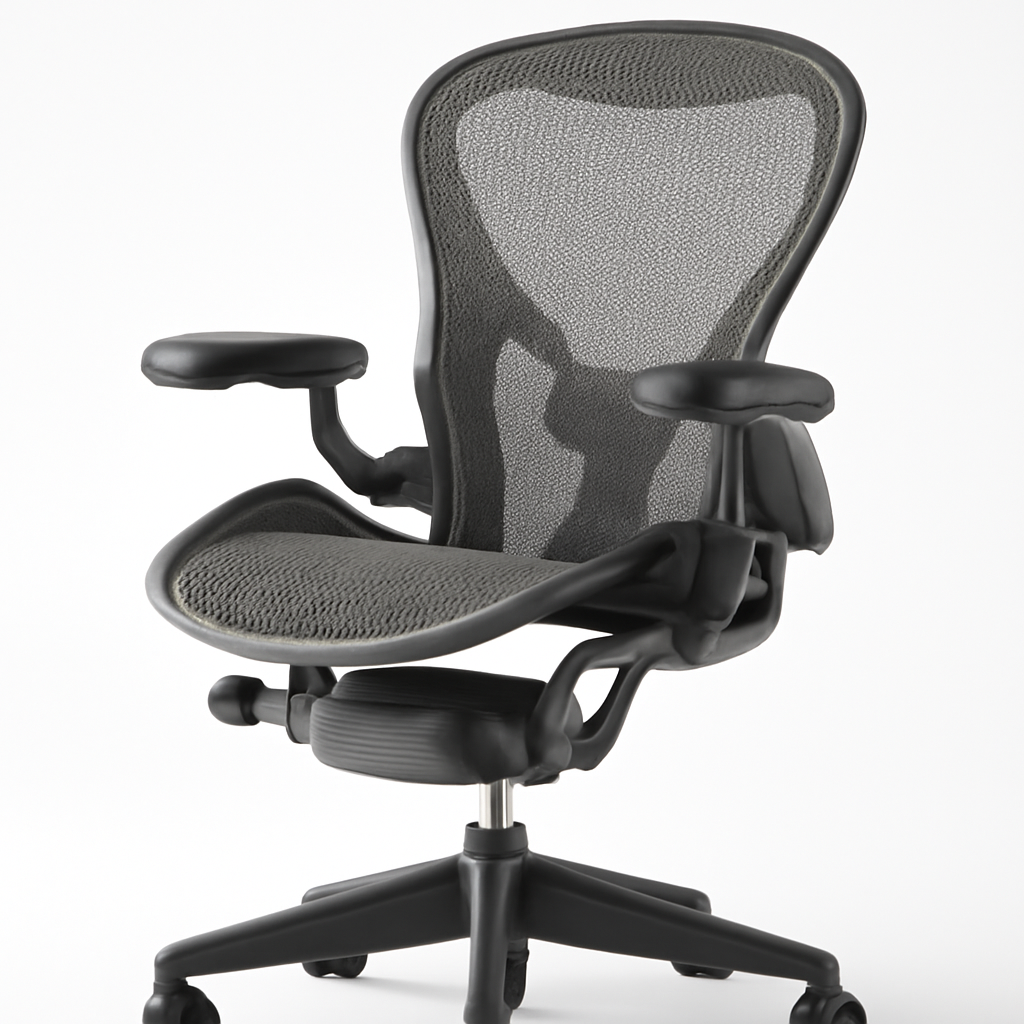
Best Overall Office Chair 2026: Herman Miller Aeron
Price Range:
The Herman Miller Aeron isn’t the flashiest chair, and it’s not the cheapest. But it’s been the standard in serious offices since 1994 for a reason: it works.
What Makes It Stand Out
The Aeron uses Herman Miller’s PostureFit technology, which supports your pelvis and lower spine with precision. The seat is engineered, not just cushioned—it uses a 8Z Pellicle material that breathes, doesn’t compress, and lasts 10+ years without degrading.
You get:
– 12 separate adjustments (including forward tilt, backward tilt, seat height, lumbar depth, lumbar height)
– Genuine 12-year warranty (not just on parts—on the whole chair)
– Recyclable design (Herman Miller takes back old Aerons)
– Fits most body types (available in three sizes: A, B, C)
Pros
✅ Unmatched long-term durability (many offices still use 15+ year old Aerons)
✅ Excellent lumbar and pelvis support—actually reduces back pain
✅ Breathable mesh means no sweating on the back
✅ Easy to adjust; learns your body within a week
✅ Resale value is strong (used Aerons sell for 50-60% of retail)
Cons
❌ High initial cost ($1,395 list price, though often discounted)
❌ Minimal padding—feels firm at first (takes adjustment)
❌ Expensive repairs if something breaks after warranty
❌ Not ideal if you like a “soft” feeling chair
Who Should Buy It
Freelancers, remote workers, and anyone spending 40+ hours/week in a chair. The Aeron pays for itself in reduced back pain and physical therapy bills within 2-3 years.
—
Best Budget-Friendly Office Chair: Autonomous Kinn
Price Range:
You don’t need to spend $1,400 to get a solid office chair. The Autonomous Kinn is a 2026 standout that delivers 80% of premium chair quality at 40% of the price.
What Makes It Great for the Money
Autonomous designed the Kinn specifically to undercut brands like Steelcase and Herman Miller. It has:
– Adjustable lumbar support (moves in/out and up/down)
– Tilt lock and recline tension control
– Breathable mesh back and fabric seat
– Armrests with height and width adjustment
– 5-year warranty (solid for the price point)
Pros
✅ Excellent value—genuinely good support at budget prices
✅ Easy to assemble (comes with clear instructions)
✅ Lumbar support is customizable for different back shapes
✅ Seat height range fits people 5’2″ to 6’2″
✅ Customer reviews consistently praise comfort after break-in
Cons
❌ Not quite as durable as Herman Miller (fabric/mesh degrades faster)
❌ Warranty is 5 years vs. 12 for premium brands
❌ Armrests don’t adjust forward/backward
❌ Plastic components (not as premium-feeling as all-metal competitors)
Who Should Buy It
Students, solopreneurs, and small business owners who need a functional, comfortable chair without the enterprise price tag. Great if you’re upgrading from a folding chair or gaming chair.
—
Best Ergonomic Office Chair for Back Support: Steelcase Leap
Price Range:
If your #1 priority is eliminating back pain, the Steelcase Leap is worth the investment. It’s engineered specifically for people with chronic back issues or those recovering from injury.
What Makes It Special for Back Support
The Leap uses LiveLumbar technology—a dynamic lumbar support system that adjusts as you move. Unlike static lumbar support (which is fixed), LiveLumbar moves with your spine, preventing pressure points.
Additional features:
– Flexible backrest that moves with your torso
– Seat tension that automatically adjusts to your weight
– Front tilt mode for upright posture (reduces slouching)
– Spine-aligned design (the whole chair, not just the lumbar region, follows spinal curves)
Pros
✅ Best for back pain sufferers (used in physical therapy offices)
✅ Automatically adjusts to different seated positions
✅ Wide seat accommodates larger body types
✅ 12-year warranty (same as Herman Miller)
✅ Looks more modern than the Aeron (if aesthetics matter)
Cons
❌ Similar price to Herman Miller, higher than most competitors
❌ Complexity—takes time to learn all the adjustments
❌ Heavier than other chairs (harder to move if you change desks)
❌ May be “too much” if you don’t have existing back pain
Who Should Buy It
Anyone with diagnosed back issues, chronic pain, or a history of injury. Also good for people with larger builds (the Leap has a higher weight capacity than most chairs).
—
Best Gaming Office Chair for Long Hours: Autonomous MyoChair
Price Range:
Wait—why is a gaming chair in an office chair guide? Because in 2026, the line is blurring. Remote work and gaming ergonomics overlap, and if you’re working long hours in a chair, gaming chair engineering can actually help.
The Autonomous MyoChair bridges the gap: it’s not flashy or covered in RGB lights, but it’s engineered for people who sit 12+ hours without moving.
What Makes It Different
Instead of copying racing-car aesthetics, MyoChair focuses on:
– Extra-wide seat (accommodates different postures)
– Multiple recline positions (from upright for work to nearly flat for breaks)
– Contoured backrest that supports the full spine
– Larger armrests for wrist support during gaming or typing
– Heavy-duty construction (rated for up to 300+ lbs)
Pros
✅ Handles extreme sitting sessions without fatigue
✅ Recline mechanism is smooth and doesn’t feel cheap
✅ Good for people who switch between work and gaming
✅ More affordable than Herman Miller without sacrificing quality
✅ Stands up to aggressive use (doesn’t wear out quickly)
Cons
❌ Larger footprint (not ideal for small spaces)
❌ Seat is firmer than some prefer (no soft cushioning)
❌ Lumbar support is fixed (not adjustable)
❌ May feel “gamer-ish” in professional office settings
Who Should Buy It
Remote workers who also game, content creators with long editing sessions, or anyone who values recline functionality and long-hour comfort over traditional office aesthetics.
—
Best Compact Office Chair for Small Spaces: Steelcase Series 1
Price Range:
Living in a small apartment? Working in a closet-sized home office? The Steelcase Series 1 is a full-featured office chair that doesn’t dominate your space.
What Makes It Compact Without Being Cheap
Steelcase engineered Series 1 specifically for smaller bodies and tighter spaces:
– Narrow backrest (doesn’t jut out as far as standard chairs)
– Compact seat without sacrificing depth
– Standard height range but with a smaller overall profile
– Simplified adjustments (no overwhelming number of levers and buttons)
– Same build quality as their premium Leap model
Pros
✅ Takes up significantly less floor space
✅ Full adjustability despite smaller size
✅ Lightweight and easy to move
✅ Still has proper lumbar support
✅ Looks sleek in small spaces
Cons
❌ Not suitable for taller people (best for under 5’8″)
❌ Narrower seat—not ideal for wider body types
❌ Simplified adjustments mean fewer customization options
❌ Less recline range than standard-sized chairs
Who Should Buy It
Apartment dwellers, students in dorms, or anyone with a space-constrained home office. Also good for people of smaller stature who feel lost in standard-sized chairs.
—
How to Choose the Right Office Chair for Your Needs
So you’ve read through the options. Here’s how to actually decide:
Step 1: Assess Your Pain Points
Do you have back pain?
→ Invest in lumbar support (Steelcase Leap or Herman Miller Aeron)
Do you work 40+ hours per week in a chair?
→ Prioritize durability; initial cost matters less than long-term value
Is space limited?
→ Compact option (Steelcase Series 1) or mid-size budget pick (Autonomous Kinn)
Do you recline a lot?
→ Look for smooth recline mechanism (MyoChair, Leap)
Step 2: Set a Realistic Budget
| Budget Range | Best Choice |
| Under $500 | Autonomous Kinn |
| $500-$900 | Steelcase Series 1 or Autonomous MyoChair |
| $900-$1,400 | Steelcase Leap |
| $1,400+ | Herman Miller Aeron |
Remember: a chair is an investment. Spending extra $200 now saves money on future physical therapy.
Step 3: Test Before Buying (If Possible)
Real talk: chairs feel different in person than online. If you can:
– Visit a showroom and sit in each chair for 5+ minutes
– Adjust all the controls to your preferences
– Imagine yourself in that chair for 8 hours
If buying online, check return policies carefully.
Step 4: Consider Your Desk Height
An office chair is only effective if it works with your desk. Your forearms should be at a 90-degree angle when typing. Adjust the chair height to achieve this, not the other way around.
If your desk is unusually high or low, mention that when choosing a chair (affects height range needs).
Step 5: Read Reviews Specifically About Durability
Manufacturers claim durability; real owners report it. Look for reviews from people who’ve owned the chair for 3+ years, not just 3 months.
—
Top Picks Comparison Table
| Product | Best For | Price Range | Key Feature |
| Herman Miller Aeron | Long-term durability & back support | $1,200-$1,600 | PostureFit lumbar system; 12-year warranty |
| Autonomous Kinn | Budget-conscious shoppers | $400-$600 | Adjustable lumbar support; great value |
| Steelcase Leap | Chronic back pain | $1,000-$1,400 | LiveLumbar dynamic support; auto-adjusting |
| Autonomous MyoChair | Long-hour sitters & gamers | $600-$800 | Multiple recline positions; wide seat |
| Steelcase Series 1 | Small spaces & compact builds | $500-$700 | Narrow profile; full adjustability |
—
Our Verdict
In 2026, there’s no single “best” office chair—there’s a best chair for you. But here’s our recommendation:
If you have the budget: Herman Miller Aeron is the safest bet. It’s expensive upfront, but it genuinely lasts 10+ years, and back pain relief alone justifies the cost.
If budget is tight: Autonomous Kinn delivers surprising quality without the enterprise price tag. You lose the 12-year warranty and some fine-tuning, but you don’t sacrifice basic ergonomics.
If back pain is severe: Steelcase Leap is worth stretching your budget for. Its LiveLumbar technology actively supports your spine in ways other chairs can’t.
If you need compact: Steelcase Series 1 is the only chair in this guide that doesn’t compromise on features despite being smaller.
The most important thing? Actually choose one. An $800 chair you sit in is infinitely better than a $150 gaming chair that causes pain. Your back—and your productivity—will thank you.