Quick Answer
If you spend 8+ hours daily in an office chair, investing in a quality model is non-negotiable for your back health and productivity. The best UK office chairs combine lumbar support, adjustability, and durability without breaking the bank. For most home office workers, the Herman Miller Aeron delivers legendary ergonomics, while the Autonomous Ergo Chair Pro offers better value for those on tighter budgets. This guide breaks down everything you need to know to choose the right chair for your space and working style.
—
What Makes a Great Office Chair? Key Features Explained
Before diving into specific models, let’s establish what separates a genuinely supportive office chair from a cheap knockoff that’ll leave your back screaming by 3pm.
Lumbar Support (The Non-Negotiable Feature)
Your lower back has a natural curve called lumbar lordosis. A proper office chair supports this curve rather than forcing you into an unnatural slouch. Look for chairs with either built-in lumbar curves or adjustable lumbar support pillows. This is the single most important feature for preventing back pain during long work sessions.
Seat Height and Adjustment Range
Your feet should rest flat on the floor with your knees at a 90-degree angle when seated. The seat height should adjust from approximately 40-55cm from the ground. If a chair’s height range doesn’t suit your body, no amount of other features will help.
Seat Depth and Width
A seat that’s too deep will put pressure behind your knees. Too shallow and you won’t get proper thigh support. Ideal seat depth is typically 40-45cm, with width around 45-50cm. Heavier users should look for “big and tall” options with reinforced bases.
Backrest Angle and Recline
A 15-20 degree recline range gives you flexibility for different tasks. Some chairs lock at specific angles, while others feature free-float mechanisms that adjust resistance to your weight automatically.
Armrest Quality
Many people overlook armrests, but poor ones create shoulder and neck tension. The best office chairs have adjustable armrests that support your forearms without forcing your arms into unnatural positions. Look for height, width, and angle adjustment.
Base and Wheel Quality
A sturdy five-point base (never buy a four-point base) with smooth-rolling casters prevents your chair from tipping. For hard floors, look for polyurethane wheels that don’t scratch. Carpet users need standard nylon casters with more grip.
—
Best Overall Office Chairs for UK Home Offices
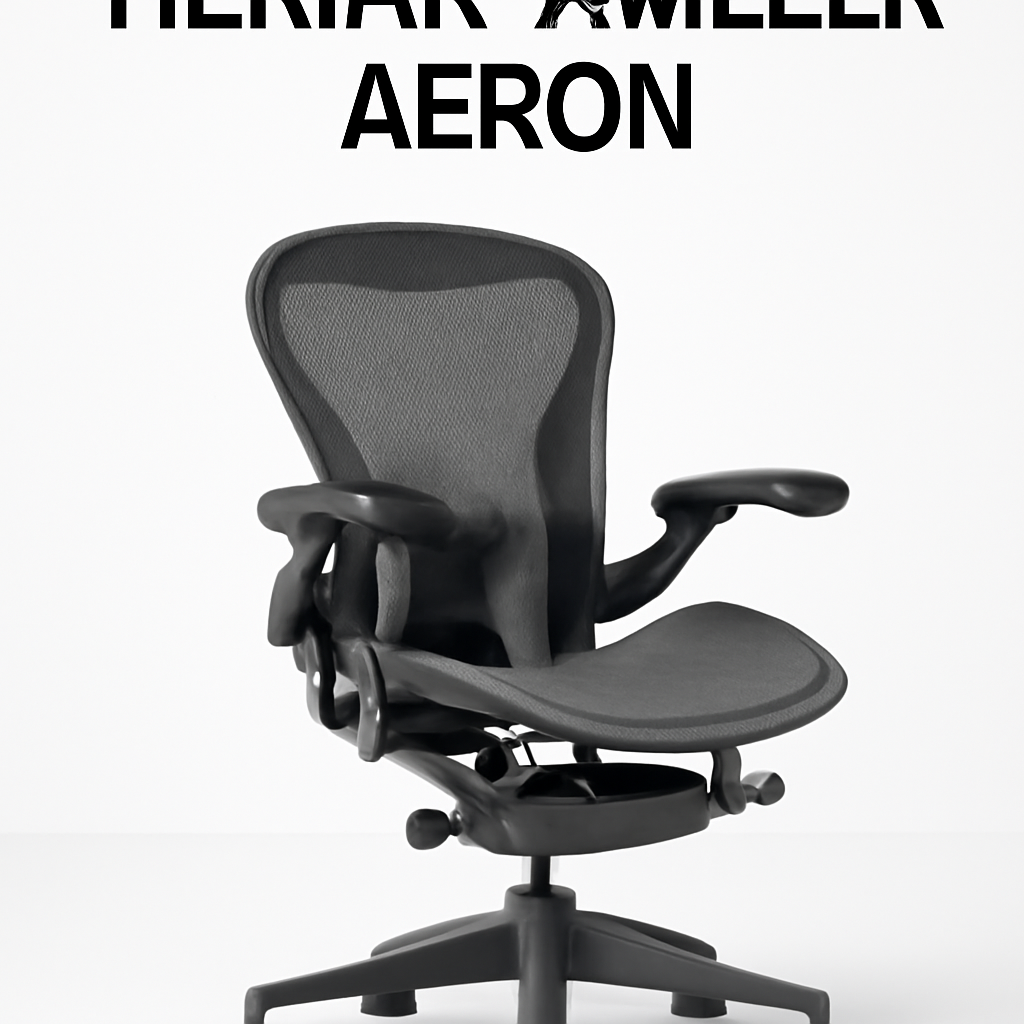
Herman Miller Aeron
The Aeron is the gold standard—and for good reason. Designed by industrial design legends Don Chadwick and Bill Stumpf, this chair has been in continuous production since 1994 because it simply works.
Why it wins:
– PostureFit lumbar support that actually adapts to your spine’s curve
– Perfectly balanced recline mechanism (8Z Pellicle suspension)
– Available in three sizes (A, B, C) to fit different body types
– 12-year warranty in the UK
– Made from 75% recycled materials
Pros:
– Unmatched ergonomic design backed by decades of research
– Extremely durable; many used models sell for 70% of original price
– Excellent customer support from Herman Miller’s UK network
– The mesh back keeps you cool even in warm offices
Cons:
– Premium price point (around £1,500+ in the UK)
– Takes 10-15 minutes to dial in all adjustments properly
– The minimalist aesthetic isn’t for everyone
Who should buy it: Anyone spending 40+ hours weekly in a chair who values long-term health and won’t mind the investment cost.
—
Autonomous Ergo Chair Pro
If Herman Miller’s price makes you wince, the Autonomous Ergo Chair Pro deserves serious consideration. It’s designed specifically for the UK remote work market and punches well above its price point.
Why it stands out:
– Fully adjustable lumbar support with memory foam padding
– 360-degree armrest adjustment (height, width, depth, angle)
– Heavy-duty nylon base rated for users up to 136kg
– Available in black and grey mesh
– Ships fully assembled in the UK
Pros:
– Around £300-400, making it accessible for budget-conscious buyers
– The adjustment range is genuinely impressive for the price
– Mesh back prevents heat buildup during summer months
– Responsive UK customer service with 30-day returns
Cons:
– The recline mechanism feels less refined than premium chairs
– Armrests don’t quite have the buttery smoothness of Herman Miller
– Base wheels are standard quality (fine, but not premium)
Who should buy it: Home office workers under 5’10” with good posture who want 80% of the Aeron experience at 25% of the cost.
—
Steelcase Leap
Steelcase’s Leap is the serious competitor to the Aeron—and many ergonomic experts argue it actually outperforms Herman Miller for tall users (6’+ tall).
Why it’s worth considering:
– LiveBack technology that supports your spine through the entire recline movement
– Available in multiple sizes including tall variants
– Superior armrest design with greater adjustment range
– Better for wide users; seat width is noticeably more generous
– 12-year warranty matches the Aeron
Pros:
– Better for taller body types than the Aeron
– Seat is more spacious without feeling sloppy
– The recline feels more natural and less “locked”
– UK pricing is often slightly lower than Herman Miller
Cons:
– Slightly heavier, making it harder to reposition
– Less attractive aesthetics compared to Aeron’s minimalism
– Smaller UK dealer network than Herman Miller
Who should buy it: Taller office workers (6’2″+) or those with broader builds who found the Aeron uncomfortable during testing.
—
Best Office Chairs for UK Home Offices: Top Picks at a Glance
| Product | Best For | Price Range | Key Feature |
| Herman Miller Aeron | Long-term investment, all-day comfort | £1,400-1,600 | PostureFit lumbar support |
| Autonomous Ergo Chair Pro | Budget-conscious remote workers | £300-450 | Adjustable lumbar + full armrest control |
| Steelcase Leap | Tall users (6’2″+) | £1,200-1,500 | LiveBack spine support |
| Noblechairs Icon | Gaming + office hybrid use | £400-550 | Premium materials, racing-inspired design |
—
Budget-Friendly Office Chairs Under £300
Not everyone can justify spending four figures on a chair. Here’s how to get genuine ergonomic support without sacrificing your monthly budget.
Noblechairs Icon
Don’t let the gaming association fool you—the Icon is a legitimate office chair with comfort that punches well above its price. It’s the most affordable option here but still feels premium.
Key specs:
– Adjustable lumbar and cervical pillows (not just fixed support)
– Reclines to 135 degrees
– 4D adjustable armrests
– Cold-cure foam cushioning
– Rated for users up to 150kg
Pros:
– Exceptional value; feels like a £600+ chair
– The adjustable pillows let you customize support perfectly
– Looks professional despite being budget-friendly
– Sturdy base with excellent wheel quality
Cons:
– Takes 30 minutes to fully adjust for optimal comfort
– The synthetic leather needs regular cleaning (can look grubby if neglected)
– Recline is a bit too aggressive for some office tasks
Verdict: Best budget option for home office workers who don’t mind tweaking settings and want a chair that’ll last 5+ years.
—
What to Expect in the £150-250 Range
If you’re looking at chairs between £150-250, understand what you’re trading off:
– Basic lumbar support instead of adjustable systems
– Limited armrest movement (usually just height adjustment)
– Simpler recline mechanisms without fine-tuned tension
– Shorter warranty periods (typically 1-3 years)
– Less durable materials that may show wear after 2-3 years
For occasional users or temporary setups, budget chairs work fine. But if you spend 30+ hours weekly in the chair, saving £200 now will cost you in back pain and frequent replacements.
—
Premium Ergonomic Chairs for All-Day Comfort
When budget isn’t the limiting factor, these chairs offer features that make 8-10 hour working days genuinely comfortable.
Herman Miller Mirra 2
Mirra 2 is Herman Miller’s answer to users who find the Aeron’s aesthetics too stark or who prefer a different recline feel.
Standout features:
– Butterfly backrest technology that moves with your spine
– More pronounced seat curve for better pressure distribution
– Adjustable PostureFit matches your specific spinal curve
– Excellent for fidgeting (the backrest responds to movement)
– 12-year warranty
Best for: Users who’ve tried the Aeron and found it too rigid, or those with sensitive lower backs that appreciate responsive support.
Price: – typically £1,200-1,400
—
What Premium Means (Beyond the Price Tag)
Premium office chairs differ from budget alternatives in these concrete ways:
| Aspect | Budget Chairs | Premium Chairs |
| Lumbar Adjustment | Fixed or simple tilt | Independently adjustable height and depth |
| Base Materials | Plastic reinforcement | Aluminum or steel |
| Warranty | 1-3 years | 10-12 years |
| Weight Capacity | 100-120kg | 120-180kg |
| Materials | Mesh or faux leather | High-grade mesh, genuine leather on top models |
| Customization | Limited sizes | Multiple size options |
| Resale Value | 20-30% of original price | 60-75% of original price |
—
Gaming vs Office Chairs: Which Is Right for You?
This question comes up constantly. Here’s the honest answer.
Gaming Chairs: Racing-Inspired Aesthetics, Office Compromises
Gaming chairs prioritize looks and recline capability over ergonomic subtlety:
– Extreme reclines (often to 180 degrees) make them unsuitable for actual work
– The racing bucket seat design encourages slouching during focused tasks
– Neck and lumbar pillows are afterthoughts, not integrated support
– High visual profile (bright colors, racing stripes) doesn’t suit professional spaces
– Generally offer 2-3 years of durability before creaking and sagging
Office Chairs: Ergonomics Over Drama
True office chairs prioritize spine support and sustainable posture:
– Moderate recline (15-20 degrees) suits actual working positions
– Subtle design works in professional settings
– Integrated lumbar support rather than removable pillows
– Materials and construction designed for 5-10 year durability
– Quieter, more refined movement mechanisms
Our take: If you’re gaming AND working from the same chair, you’re compromising on both tasks. Get a dedicated office chair for work. If you have budget leftover, invest in a budget gaming chair for weekends—it won’t hurt you for leisure use.
—
How to Choose the Right Chair for Your Space
Buying an office chair without considering your specific situation is a recipe for buyer’s remorse.
Step 1: Measure Your Space
Before even looking at chairs, measure:
– Desk height (typically 71-76cm)
– Available floor space around the desk
– Clearance under the desk (some office chairs need more space to recline)
– Ceiling height (relevant if you recline and lean back significantly)
A chair that’s too large will feel cramped and limit your movement. Too small and you’ll sit on the edge, defeating the ergonomic purpose.
Step 2: Identify Your Body Type Match
Office chairs come in three core sizes:
| Size | Best For | Key Dimension |
| Small (A) | Users under 5’5″ or < 75kg | Compact seat depth, lower height range |
| Medium (B) | Average build, 5’5″-6’0″ | Standard dimensions, widest availability |
| Large (C) | Taller users or heavier users | Deeper seat, extended height range |
Using the wrong size is the #1 reason people return chairs. Herman Miller Aeron and Steelcase Leap both offer proper sizing—use this feature.
Step 3: Consider Your Daily Schedule
– 30 hours+/week: Premium chair essential; you’ll spend 1,000+ hours yearly here
– 15-30 hours/week: Mid-range chair (£300-600) is smart
– Under 15 hours/week: Budget chair fine; add a monitor arm to reduce neck strain
Step 4: Test Before Buying
The single best thing you can do is sit in the actual chair before purchasing. Visit:
– John Lewis (stocks multiple brands)
– Furniture retailers with showrooms
– Office furniture suppliers offering demos
– Manufacturer showrooms (Herman Miller and Steelcase have UK locations)
Spend 10 minutes in each chair, actually sitting in your typical working posture. Fidget. Recline. You’ll immediately feel differences that reviews can’t convey.
Step 5: Budget Allocation Reality
– Premium investment: £1,200-1,600 (Herman Miller Aeron, Steelcase Leap)
– Mid-range sweet spot: £400-700 (Autonomous, quality gaming chairs)
– Budget baseline: £150-300 (entry ergonomic options)
– Ultra-budget: Under £150 (avoid unless very temporary use)
Remember: A £1,400 chair used for 10 years (2,000 hours/year) costs £0.07 per hour of comfort. A £200 chair that needs replacing after 3 years costs £0.03 per hour—but the back pain costs far more in reduced productivity and healthcare.
—
Office Chair Maintenance & Durability Guide
Buying the right chair is half the battle. Maintaining it properly ensures it stays supportive for years.
Daily Care
– Adjust before sitting: Spend 20 seconds ensuring lumbar support, armrests, and seat height are correct. This prevents gradual slouching that ruins posture.
– Roll correctly: Always roll on hard flooring when possible. Carpets create friction that strains the casters and base.
– Clean regularly: Dust mesh weekly. Wipe down with a soft cloth. For spills, use a damp cloth immediately—don’t let liquids soak into the mesh.
Weekly Maintenance
– Check armrest stability: Ensure they’re tightened properly. Loose armrests create stress on attachment points.
– Inspect casters: Look for hair or debris wrapped around wheels. Remove it—this prevents squeaking and uneven rolling.
– Adjust tension: The recline tension should feel firm, not rock-loose. Herman Miller and Steelcase chairs allow tension adjustment; check your manual.
Monthly Deep Cleaning
– Mesh back: Use a soft brush or vacuum with upholstery attachment to remove dust trapped in the mesh.
– Seat cushion: Flip if possible, or rotate to even out wear patterns.
– Base and wheels: Wipe down the base with a damp cloth. Check wheels aren’t flat-spotted.
When to Replace Components
Premium chairs like the Aeron and Leap have replaceable parts:
– Casters: Expected lifespan 5-7 years; replacement sets cost £40-80
– Cushions: 7-10 years; replacement cushions available directly from manufacturers
– Armrest pads: 5-10 years; these get more wear than you’d expect
Budget chairs typically aren’t designed for component replacement, so plan to replace the whole chair when components fail.
Storage & Moving
If you’re relocating or storing your chair:
– Don’t compress it: Store the chair upright; squashing it long-term damages foam and support structure
– Protect the base: The five-point base is sturdy but can crack if sat on. Keep it elevated off ground
– Avoid extreme temperatures: Sustained heat (above 35°C) or cold (below 5°C) degrades foam and plastic components
—
Our Verdict: Final Buying Recommendation
Here’s who should buy what:
Best Overall Choice: Herman Miller Aeron
If you work from home 40+ hours weekly and have the budget, the Aeron is simply the best office chair available in the UK right now. Yes, it’s expensive. Yes, you can get 80% of the comfort cheaper. But you’ll get 100% of the research, warranty, and resale value. In 2