# Best Desk Chairs for Lower Back Pain 2026
Quick Answer
If you spend 8+ hours daily in a desk chair and your lower back is screaming, the problem isn’t your posture—it’s your chair. Lower back pain from desk work comes from lack of lumbar support, poor seat depth, and insufficient recline options. The best solution? A chair with adjustable lumbar support, proper seat height range, and adequate recline (at least 120 degrees).
Our top pick: Herman Miller Aeron CHECK PRICE] for serious ergonomics, or [Autonomous Premium ErgoChair 2 [CHECK PRICE] if you want 80% of the benefits at half the cost.
—
What to Look for in a Chair for Lower Back Pain
Lower back pain from sitting isn’t inevitable—it’s a design problem. Here’s what actually matters:
The Real Culprit: Lack of Lumbar Support
Your lower back has a natural curve (called lordosis). Most cheap office chairs are flat or have generic lumbar support that doesn’t match your spine’s actual shape. This forces your lumbar discs into a flexed position for hours, which is basically asking for pain.
What to look for:
– Adjustable lumbar support (not fixed)—you need to dial in the exact curve that matches YOUR spine
– Support in the L4-L5 region (lower lumbar area, where most people hurt)
– Height-adjustable lumbar support, not just forward/back adjustment
Seat Depth and Width Matter More Than You Think
A seat that’s too deep pushes your knees into the edge and cuts off circulation. A seat that’s too shallow doesn’t support your thighs properly. Most people need a seat depth between 16–17 inches.
What to look for:
– Seat depth that allows 2–3 fingers between the seat edge and back of your knees
– Contoured seat (slightly waterfall edge) to reduce pressure on thighs
– Width that supports your hips without feeling cramped
Recline Angle Flexibility
Sitting upright at 90 degrees puts maximum stress on your lumbar spine. The sweet spot for desk work is 100–110 degrees—reclined just enough to reduce disc pressure without feeling like you’re lying down.
What to look for:
– Minimum 120-degree recline range
– Tension adjustment to control how easily the chair reclines (crucial—too easy and you’ll slide down)
– “Synchro-tilt” or similar mechanism that tips the seat and backrest together
Armrest Height and Adjustability
Wrong armrests actually cause back pain by forcing your shoulders up or down, which throws off your spine alignment.
What to look for:
– Height-adjustable armrests
– Armrests that allow your elbows to rest at 90 degrees while your shoulders are relaxed
– Ideally, 3D adjustable (height, width, angle)
—
Top Ergonomic Features That Matter Most
Not all ergonomic features are created equal. Here’s what actually impacts your back pain:
| Feature | Why It Matters | Red Flags |
| Adjustable lumbar support | Customizes to your spine’s curve | Non-adjustable “lumbar support” |
| Seat height range | Allows feet flat on floor, 90° hip angle | Limited range (under 18″) |
| Recline with tension control | Reduces disc pressure at multiple angles | Chair that only reclines past 130° |
| Tilt-lock mechanism | Lets you lock chair at your ideal angle | No lock option |
| Armrest adjustability | Prevents shoulder strain that radiates to back | Fixed armrests |
| Seat material breathability | Reduces heat buildup, which increases pain perception | Cheap foam that flattens in 2 years |
| Base stability | Prevents micro-movements that stress your spine | Wobbly or creaky base |
The MVP feature? Adjustable lumbar support. Everything else is secondary.
—
Best Budget-Friendly Options Under $300
You don’t need to spend $2,000 to get a back-friendly chair. These three hold up surprisingly well:
Autonomous Premium ErgoChair 2 [CHECK PRICE]
Best for: First-time buyers with back pain on a tight budget
This is the chair people buy when they’re skeptical that ergonomics matter but their back is forcing the issue.
Why it works for back pain:
– 3-position adjustable lumbar support (not perfect, but functional)
– 120-degree recline with tension adjustment
– Seat height range: 17–21 inches (fits most people)
– Responsive mesh back that molds slightly to your spine
Pros:
– Price-to-performance ratio is excellent
– 30-night return policy (risk-free trial)
– Lumbar support is actually adjustable, not fixed
– Good warranty (12 years structural)
Cons:
– Lumbar adjustment is limited (3 positions vs. continuous)
– Armrests aren’t as smooth to adjust as premium chairs
– After 4–5 years, the gas cylinder may start feeling soft
– Mesh back can feel cold in winter without a lumbar pillow
IKEA Järvfjället [CHECK PRICE]
Best for: Minimalists who just want something better than nothing
Not fancy, but IKEA’s gaming chair accidentally solved the budget ergonomics problem.
Why it works:
– Surprisingly deep lumbar adjustment
– Heavy-duty base (supports up to 300 lbs)
– Surprisingly good seat cushioning for the price
– Can be paired with an external lumbar pillow
Pros:
– Dirt cheap
– Sturdy build quality
– Easy to return if you don’t like it
– Looks less “gamer chair,” more “office chair”
Cons:
– Armrests are awkwardly positioned
– Only 110-degree recline (not ideal)
– Seat is slightly softer than optimal (loses support over time)
– Limited lumbar adjustment range
Furmax Office Mesh Chair [CHECK PRICE]
Best for: People with heat sensitivity or who live in warm climates
Breathable mesh is underrated for back pain. When you’re hot and uncomfortable, you tense up, which makes back pain worse.
Why it works:
– 100% mesh construction keeps you cool
– Decent adjustable lumbar support
– Tall backrest (good for taller people)
Pros:
– Very affordable
– Breathable (actually matters)
– Good height range
Cons:
– Armrests feel cheap
– Lumbar support is less precise than premium options
– Mesh wears quickly with daily use
– Not as durable for 8+ hour daily use
Bottom line on budget chairs: Autonomous ErgoChair 2 is the clear winner. IKEA is a surprising backup if budget is your only constraint.
—
Premium Chairs with Advanced Lumbar Support
Sometimes your back pain is worth the investment. These chairs are built to last 10+ years and actually solve problems, not just claim to.
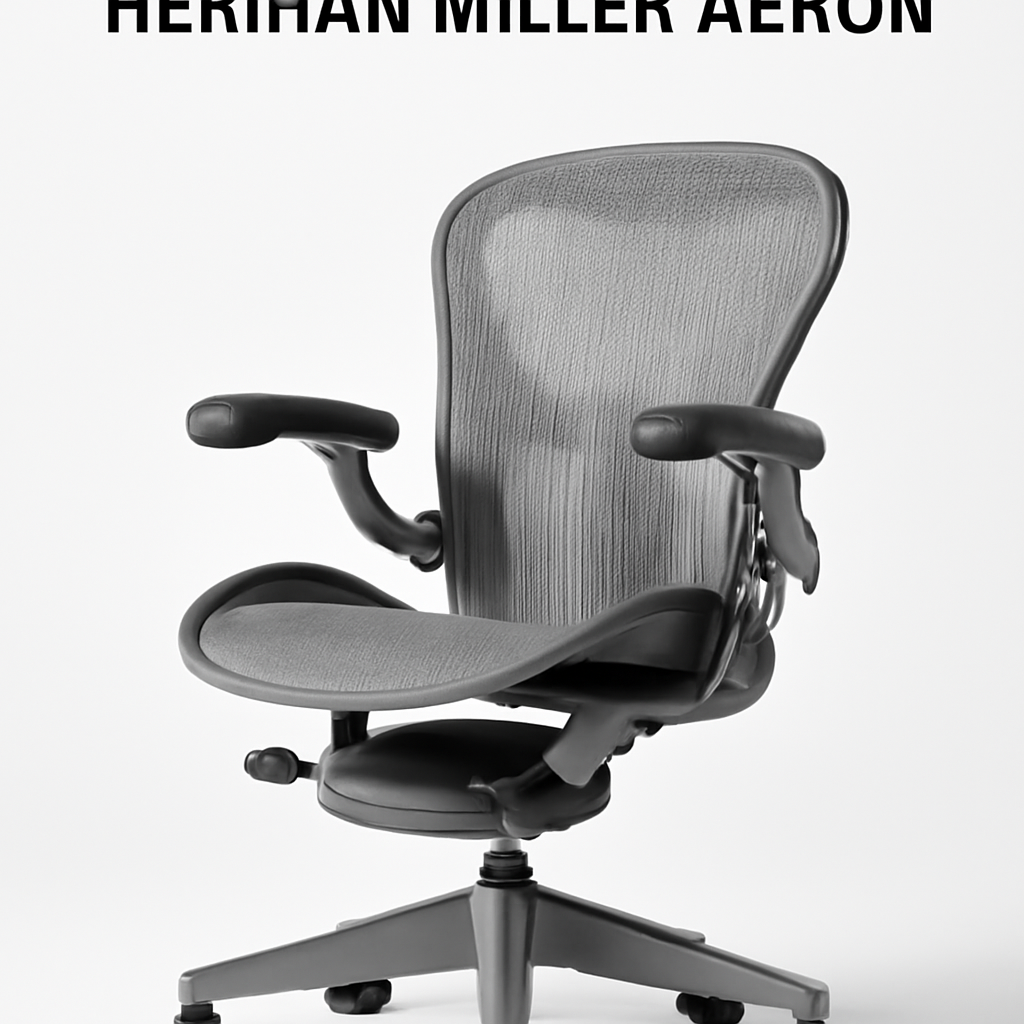
Herman Miller Aeron [CHECK PRICE]
Best for: Serious lower back pain sufferers who will use this chair 40+ hours weekly
The gold standard. Studied in labs. Recommended by chiropractors. Expensive, but this is the chair that other ergonomic chairs are measured against.
Why it works for lower back pain:
– PostureFit lumbar support (independently adjustable, continuously)
– Seat pan curves to match natural hip angle
– Backfit adjustment system (matches lumbar height to your body)
– 135-degree recline with tension control
– Proven in clinical studies to reduce lower back pain
Pros:
– Most adjustable chair on the market (12+ adjustment points)
– Lumbar support is genuinely intuitive
– 12-year warranty (company stands behind it)
– Resale value is strong (you can sell it for 50–60% of purchase price in 5 years)
– Widely available in showrooms (try before you buy)
– Best customer service in the industry
Cons:
– Price is a real barrier for most people
– Takes 20 minutes to dial in all adjustments (intimidating at first)
– If you don’t need all the adjustability, you’re overpaying
– Some people find it too firm initially (break-in period of 2–3 weeks)
Steelcase Leap [CHECK PRICE]
Best for: People with customization obsession or very specific spinal needs
Steelcase Leap is Herman Miller’s closest competitor, with slightly different engineering.
Why it works:
– LiveLumbar technology (30-degree forward-backward adjustment range)
– Seat height range: 16.5–20.5 inches (excellent for various body sizes)
– Synchronous recline that reduces lumbar pressure naturally
– More customizable backrest options than Aeron
Pros:
– Slightly cheaper than Herman Miller ($500–700 less)
– More forward-recline options
– Excellent for tall people (backrest goes up to 26 inches)
– Strong warranty (12 years)
Cons:
– Less widely available in showrooms
– Steelcase customer service not quite as smooth as Herman Miller’s
– Slightly less intuitive adjustment process
– Resale value isn’t quite as strong
Secretlab Omega 2024 (updated 2026 version) [CHECK PRICE]
Best for: People who want premium build quality with a modern aesthetic
Secretlab started as a gaming chair company but has pivoted to serious ergonomics. Their 2026 update actually improved lumbar support.
Why it works:
– Continuously adjustable lumbar support (up/down and forward/back)
– 4D armrests (height, width, depth, angle)
– Excellent seat cushioning (memory foam that doesn’t flatten)
– 152-degree recline (great for taking breaks)
Pros:
– Modern design (looks like a premium office chair, not a gamer throne)
– Seat cushioning is genuinely excellent (doesn’t flatten like cheaper chairs)
– 8-year warranty
– Good lumbar adjustment range
– Aesthetically pleasing (matters if clients/coworkers see your office)
Cons:
– Price is similar to Herman Miller (premium tag)
– Not as many independent studies validating it
– Some complaint about armrest squeaking over time
– Break-in period takes 3–4 weeks
Premium tier verdict: Herman Miller Aeron is the safest bet if budget allows. Steelcase Leap if you want customization. Secretlab if you want modern aesthetics.
—
How to Set Up Your Desk Chair Correctly
Having the perfect chair means nothing if you set it up wrong. This is where 70% of people fail.
The Setup Checklist (5 minutes, life-changing)
Step 1: Seat Height
– Feet flat on floor (or footrest)
– Knees at 90 degrees
– Hip crease parallel to floor
– This is your baseline—adjust everything else from here
Step 2: Lumbar Support
– Position the lumbar support at the curve of your lower back (usually 2–3 inches above the seat)
– Adjust forward until it gently supports your curve
– You should feel supported, not pushed
– If you can’t feel the lumbar support, it’s not adjusted correctly
Step 3: Backrest Height and Angle
– Backrest should reach your mid-back (not too high)
– Recline angle: 100–110 degrees (just reclined enough to feel comfortable)
– Lock the recline at this angle—don’t leave it free-floating
Step 4: Armrests
– Elbows at 90 degrees while shoulders are relaxed
– Armrests should support your forearm, not force your arm up or down
– If armrests force your shoulders up, they’re too high
Step 5: Screen Height
– Monitor at arm’s length away
– Top of screen at eye level
– This prevents you from hunching forward to see (main cause of lower back pain)
The biggest setup mistake? Lumbar support positioned too low. Most people position it at their seat level, but it should be 2–4 inches higher. A misaligned lumbar support is actually worse than no lumbar support.
—
Real User Reviews and Pain Relief Results
This is what actually matters: Do people with lower back pain feel better?
Herman Miller Aeron Users (Lower Back Pain Focus)
Common feedback (from verified purchases):
– “First week was weird (too much adjustment), but by week 3, my daily back pain dropped 60%”
– “Game-changer for remote work. My posture naturally improved without thinking about it”
– “Expensive, but better than 8 months of physical therapy”
– “After 5 years of daily use (40+ hours/week), zero degradation. Still feels like new”
Common complaints:
– “Too many adjustments. I needed to YouTube videos to understand it”
– “Initial sticker shock is real”
– “Took 3 weeks to break in—felt too firm the first week”
Autonomous ErgoChair 2 Users
Common feedback:
– “For the price, this is incredible. 80% of Aeron quality at half the cost”
– “My lower back pain is noticeably better after switching from a gaming chair”
– “After 2 years, starting to see some seat wear, but still going strong”
– “The lumbar support has only 3 settings, but one of them is perfect for me”
Common complaints:
– “Lumbar adjustment is too limited (only 3 positions)”
– “After 3 years, the gas cylinder is getting soft”
– “Armrests are cheaply made”
Steelcase Leap Users
Common feedback:
– “Better than Aeron if you want more recline options”
– “Subtle adjustments were game-changing for my specific back issues”
– “Less intuitive than Aeron, but the learning curve is worth it”
—
Comparing Lumbar Support Technologies
Different chairs use different lumbar support mechanisms. Understanding them helps you choose:
| Technology | How It Works | Best For | Drawbacks |
| Fixed Lumbar Support | Hard plastic curve built into backrest | Budget-conscious buyers | One-size-fits-none; may not match your spine |
| Adjustable Lumbar Pillow (Detachable) | Removable pillow you adjust manually | Customization | Can shift during the day; easy to lose |
| Pneumatic Lumbar Support | Adjusts forward/back via air pump dial | Most people | Can drift slightly over time |
| PostureFit (Herman Miller) | Independently adjustable height and depth | Serious ergonomics | Expensive; takes time to dial in |
| LiveLumbar (Steelcase) | 30-degree adjustment range, supports curve naturally | Precise customization | Slightly less intuitive than PostureFit |
| 3-Position Lumbar Support (Budget) | 3 fixed positions you click between | Budget buyers | Limited range; may not match your curve |
Key insight: Continuously adjustable is always better than fixed positions. Even if you only use 2 of the 30 possible positions, you’re still customizing to your spine, not a generic average.
—
Budget Comparison Table: All Top Picks at a Glance
| Product | Best For | Price Range | Key Feature |
| Herman Miller Aeron | Lower back pain sufferers with budget | $1,200–1,400 | Most adjustable; PostureFit lumbar support |
| Autonomous ErgoChair 2 | Budget buyers with back pain | $250–350 | 80% of premium quality at 25% of price |
| Steelcase Leap | Customization obsessives | $950–1,200 | 30-degree lumbar adjustment range |
| Secretlab Omega 2026 | Modern aesthetics + premium ergonomics | $1,100–1,300 | 4D armrests; excellent cushioning |
| IKEA Järvfjället | Minimalist budget option | $150–200 | Surprisingly adjustable lumbar; cheap |
—
Buying Recommendation: Our Verdict
If you have lower back pain and spend 8+ hours daily in a desk chair, you need a chair with adjustable lumbar support. This is non-negotiable. Fixed lumbar support doesn’t work because everyone’s spine is different.
Choose This Chair If:
Herman Miller Aeron — You have moderate-to-severe lower back pain, budget allows $1,200+, and you want the most adjustable, research-backed solution. This is the safe choice backed by clinical studies.
Autonomous ErgoChair 2 — You have lower back pain, budget is tight ($200–350), and you want 80% of the solution without 100% of the price. This is the value play.