# Best Desk Chairs for Posture in 2026 | Home Office
Quick Answer
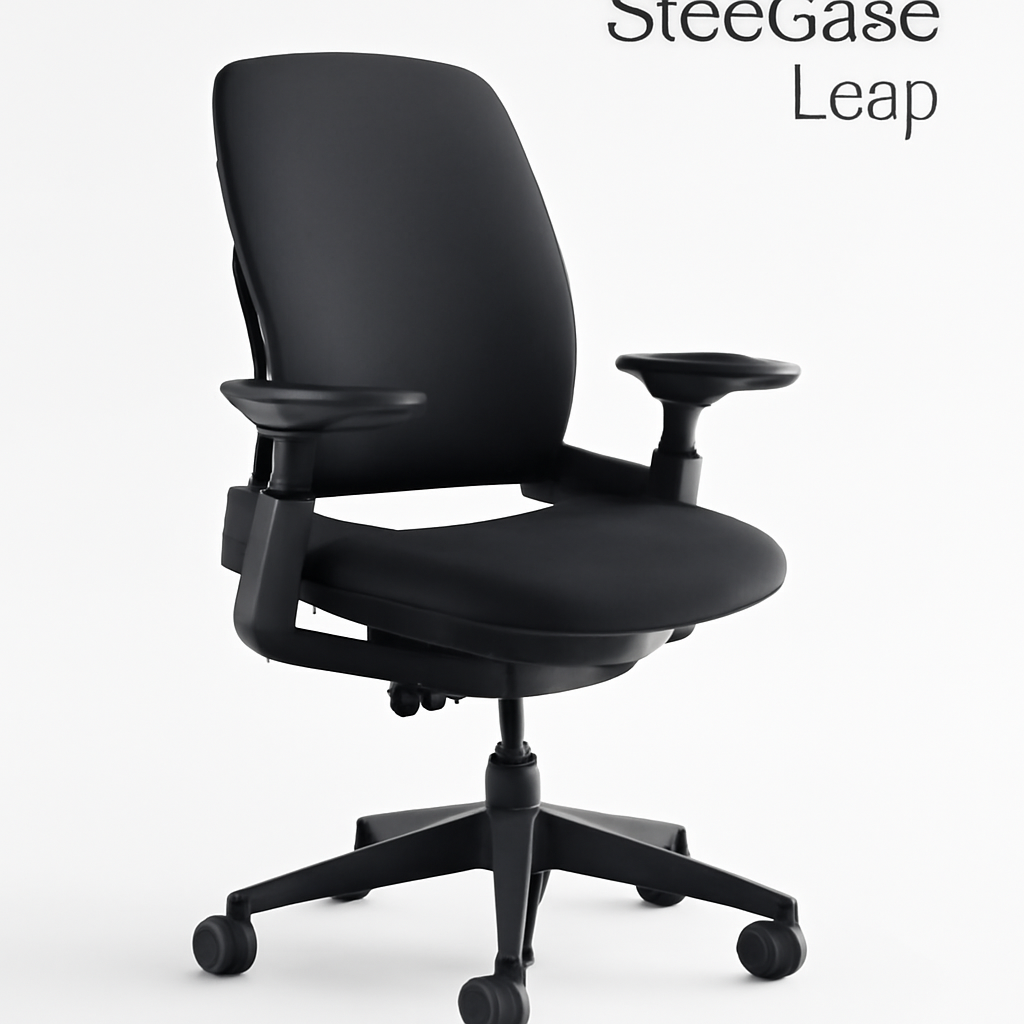
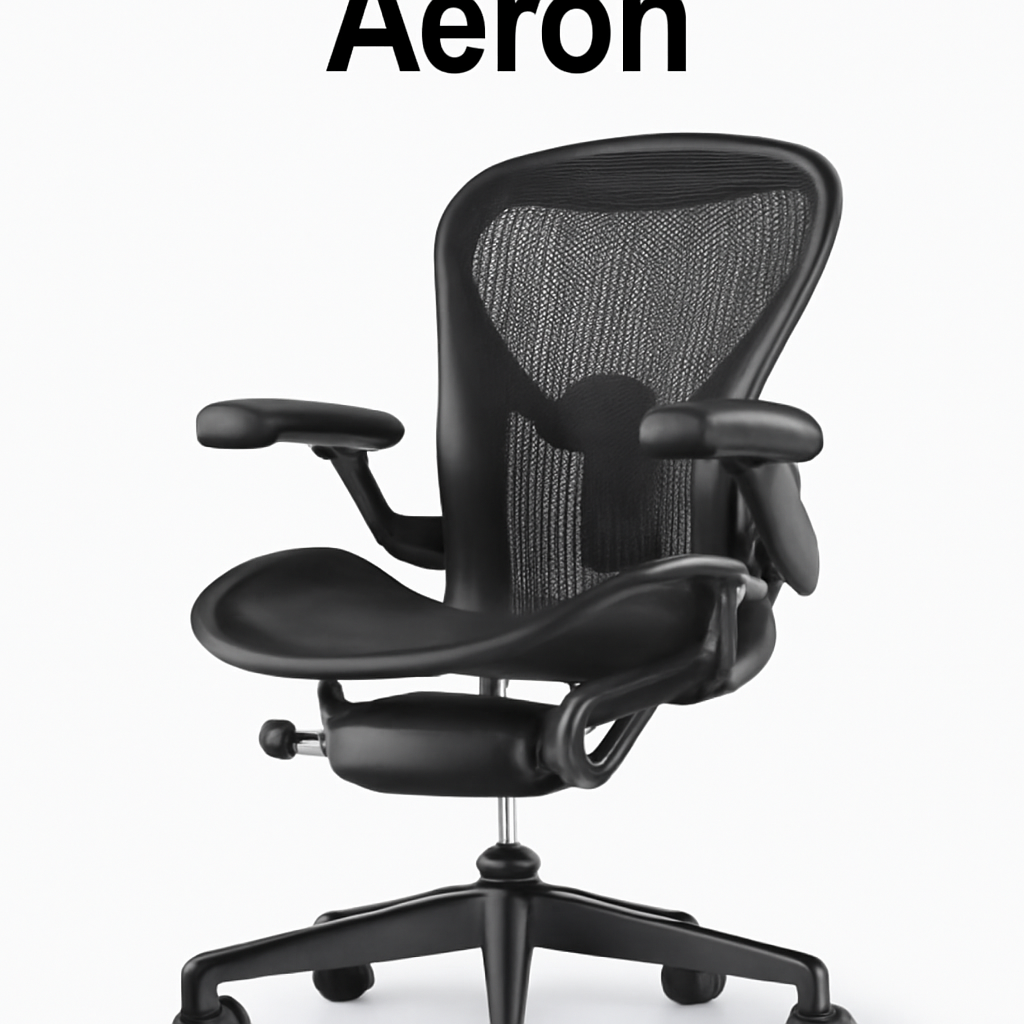
If you sit for 8+ hours daily, your chair is sabotaging your spine. A posture-focused desk chair combines lumbar support, adjustable armrests, and a reclining backrest to keep your shoulders back and your lower back aligned. Herman Miller Aeron CHECK PRICE] remains the gold standard for spinal health, but the [Autonomous Kinn Chair CHECK PRICE] offers similar ergonomic benefits at half the price. For severe back issues, the [Steelcase Leap [CHECK PRICE] with dynamic lumbar support is worth the investment.
—
What Makes a Desk Chair Good for Posture?
Sitting slouched for 8 hours doesn’t just feel bad—it compounds spinal stress hour after hour. Most office chairs prioritize looks over biomechanics, which is why 60% of desk workers report back pain.
A truly posture-friendly chair does four critical things:
1. Supports your natural spine curve. Your spine isn’t straight—it has natural curves at the neck, upper back, and lower back. A good chair maintains these curves rather than flattening them. This requires specific lumbar support that matches your body’s shape.
2. Keeps your shoulders relaxed. When your chair doesn’t support your upper body, you hunch forward to compensate. This tightens your chest and weakens your back muscles. A posture chair prevents this by encouraging your shoulders to stay neutral.
3. Positions your hips correctly. Your hips should sit slightly higher than your knees (roughly a 100-110° angle). This tilts your pelvis naturally and reduces stress on your lower back. Chairs with adjustable seat height and depth let you dial this in.
4. Enables micromovement. Static sitting—even in perfect posture—is terrible for your spine. The best posture chairs allow slight rocking or recline so you’re not locked in one position all day.
The difference between a “posture chair” and a gaming chair or basic office chair? Posture chairs are built around how your skeleton actually works, not around flashy aesthetics.
—
Top Ergonomic Features to Look For
Before you buy, know which features actually matter for your back.
Lumbar Support (Non-Negotiable)
Lumbar support means mechanical support in your lower back curve—not just a cushion, but an actual shape that matches yours.
– Fixed lumbar support: Permanent shape. Works great if your body fits the standard curve, but awkward if you’re very tall or very petite.
– Adjustable lumbar support: You can move it up/down and in/out to match your exact spinal curve. Costs more but works for 95% of body types.
– Dynamic lumbar support: Changes with you as you recline (like in the Steelcase Leap). Best option if budget allows.
Seat Height & Depth Adjustability
Your seat should adjust so your feet rest flat on the ground with knees at 90°. Seat depth should let you use the backrest while keeping 2-3 inches between the seat edge and the back of your knees.
– Most office chairs adjust 17-21 inches in height. Make sure your range fits your leg length.
– Depth should range 16-18 inches for average adults.
Armrest Design
Bad armrests (fixed, too high, too wide) actually worsen posture by forcing your shoulders up. Good armrests:
– Adjust in height, depth, and sometimes width
– Allow your arms to rest at 90° elbow angle
– Don’t interfere with desk space
Recline Function
A chair that only sits upright is limiting. You should be able to:
– Recline 15-30° while maintaining back support
– Lock at different angles (some people need more recline than others)
– Still keep your feet on the ground when reclined
Material & Breathability
Eight hours in a hot seat makes you sweaty and uncomfortable. Look for:
– Mesh backing (breathable, modern, easy to clean)
– High-density foam cushioning that doesn’t flatten after a year
– Fabric that doesn’t attract pet hair if you have a pet-friendly office
—
Top Picks at a Glance
| Product | Best For | Price Range | Key Feature |
| Herman Miller Aeron | Long-term spinal health | $1,395 | PostureFit lumbar, 12-year warranty |
| Autonomous Kinn Chair | Budget-conscious ergonomics | $499-$599 | Adjustable lumbar, mesh design |
| Steelcase Leap | Severe back issues | $1,024 | LiveLumbar dynamic support, most adaptive |
| Logitech Ergo Series | Hybrid workers | $299-$399 | Compact design, good for smaller spaces |
| Secretlab Omega 2024 | Gaming + posture | $449-$549 | Strong lateral support, premium finish |
—
Best Budget-Friendly Posture Chairs
You don’t need to spend $1,000+ to protect your spine. These chairs deliver legitimate ergonomic support without the premium price tag.
Autonomous Kinn Chair [CHECK PRICE]
Best for: Remote workers and small businesses that need quality without breaking the bank.
The Kinn Chair is what happens when an ergonomics company strips away the luxury markup and focuses on actual spinal support. It has:
– Adjustable lumbar support (height and depth) that you can dial to your exact curve
– Mesh back that breathes all day without the hot, sticky feeling of cheap mesh
– Padded seat that doesn’t pancake after six months
– Smooth recline with multiple lock positions
– Armrests that adjust in height and width
Pros:
– Saves you $800+ vs. premium alternatives
– Adjustable lumbar actually works (not just marketing)
– 30-day trial period to test at home
– Customer service is surprisingly responsive
Cons:
– Doesn’t have the brand prestige of Herman Miller (not that this matters for your back)
– Seat cushion is firmer than some prefer (you’ll adjust in 1-2 weeks)
– No warranty coverage if you spill something major on it
Best for: Freelancers, small agencies, anyone working from home 5 days/week on a realistic budget.
Logitech Ergo Series [CHECK PRICE]
Best for: People with limited desk space or hybrid workers who want something compact and adjustable.
Logitech isn’t known for office furniture, but their Ergo Series surprised us. It’s specifically designed for people who sit in desk-heavy work (coding, writing, design) without the bloated frame of traditional executive chairs.
– Compact backrest that supports your lower back without taking up half your desk
– Adjustable everything: lumbar height/depth, armrest height/width, seat depth
– Smooth gas cylinder that doesn’t get stuck at random heights
– Tilt recline with lock positions
– More stylish than average office chairs (matte black, minimalist design)
Pros:
– Takes up noticeably less space (good for small home offices)
– Assembly is genuinely straightforward
– Pricing is transparent (no surprise fees)
– Works well for people 5’2″ to 6’2″
Cons:
– Armrests are smaller (great for narrow desks, not ideal if you need heavy arm support)
– Lower recline range than premium chairs (about 15° instead of 30°)
– Seat cushion is thinner (adequate but not sumptuous)
Best for: Freelancers, apartment dwellers, anyone who prioritizes space efficiency.
—
Best Premium Desk Chairs for Spinal Support
If your back is your income (or you’ve had past injuries), spending more now prevents spending more on physiotherapy later. These chairs justify their premium price.
Herman Miller Aeron [CHECK PRICE]
The industry standard for a reason. If you’ve seen an office chair in a tech company headquarters, it was probably this one.
What makes it legendary:
– PostureFit lumbar support is the gold standard: adjustable, precise, and matches your spine’s actual curve
– 8Z Pendant (backrest tilt mechanism) lets you recline while maintaining full lumbar support
– Adjustable armrests in height, depth, and width
– 12-year manufacturer’s warranty (they expect it to outlast you in that job)
– Proven track record: Installed in offices worldwide for 30+ years
The science: Herman Miller invested in spinal research before designing this chair. Every curve, every adjustment, every material choice ties back to biomechanical studies.
Pros:
– PostureFit support is genuinely superior for people with lower back pain
– Will literally outlast cheaper chairs (you’ll buy 3 Kinn Chairs before your Aeron wears out)
– Resale value stays high (companies buy used Aerons)
– Warranty gives genuine peace of mind
– Works for people 5’3″ to 6’2″ with minimal adjustment
Cons:
– $1,395 is genuinely expensive for most people
– Takes 2-3 weeks to fully adjust (feels weird at first)
– Overkill if you only work 20 hours/week
– No reclining backrest (it stays more upright for posture)
Best for: People sitting 40+ hours weekly, anyone with diagnosed back issues, professionals whose income depends on staying healthy.
Steelcase Leap [CHECK PRICE]
The aggressive competitor to the Aeron. Steelcase targets people who need more mobility and adaptability.
The differentiator: LiveLumbar technology. This isn’t a fixed or manually adjustable curve—it’s a suspension system that moves with you as you recline. When you lean back, the lumbar support follows your spine’s natural motion.
Additional features:
– Dynamic armrests that adjust in four ways
– Flexible backrest that matches natural spinal curves during recline
– Seat slide mechanism (moves 3 inches forward/back for different desk depths)
– Weight-activated recline (no levers to fiddle with—physics handles it)
– Recyclable materials (if that matters to you)
Pros:
– LiveLumbar is genuinely innovative (your lower back moves with you, not against you)
– More recline range than Aeron (25-30°) while maintaining support
– Best for people who spend half their day reclining slightly while thinking
– Excellent for tall people (adjusts higher than Aeron)
Cons:
– $1,024 is still a major purchase
– LiveLumbar feels “loose” at first (it’s adaptive, not locked—takes adjustment)
– Steelcase has fewer physical locations to demo (Herman Miller is more available)
– Seat cushion is firmer (comfort takes 1-2 weeks)
Best for: People with lower back pain who spend time thinking/reclined, tall people (6’+), anyone who needs maximum customization.
—
How to Adjust Your Chair for Optimal Posture
Buying the right chair is 50%. Adjusting it correctly is the other 50%.
The Neutral Spine Setup
1. Seat Height: Adjust so your feet rest flat on the ground and your knees sit at roughly 90°. Your thighs should be parallel to the ground (or slightly angled downward). If you can’t reach the ground, use a footrest.
2. Lumbar Support:
– Adjust the lumbar height so the peak of the curve matches your lower back’s natural curve (usually 4-6 inches above the seat)
– Adjust the depth so it gently supports your curve without pushing you forward
– The support should feel like a hand at your back—present, not aggressive
3. Armrest Height:
– Sit naturally
– Adjust armrests so your elbows rest at 90° angles with shoulders relaxed
– Your arms should feel supported, not elevated
4. Seat Depth:
– You should be able to fit 2-3 fingers between the seat edge and the back of your knees
– If the seat is too deep, your thighs jam against the edge (bad circulation)
– If too shallow, you have no support and slide forward
5. Monitor Distance:
– Your monitor should sit 20-30 inches away
– The top of the screen should be at or slightly below eye level
– This prevents the forward head posture that no chair can fix alone
The Daily Habit
– Change positions every 30 minutes. Recline slightly, shift your weight, stand and stretch. Perfect posture all day is impossible—good posture that changes is healthy.
– Take a 5-minute walking break every 90 minutes. Your spine needs movement, not just support.
—
Desk Chair Posture vs. Other Solutions
A good chair is necessary but not sufficient. Here’s how it fits into a complete posture strategy.
Desk Chair vs. Standing Desk
Desk Chair Advantages:
– Actually good for your back (sitting is fine; poor posture is the problem)
– Less tiring (standing desk fatigue is real)
– Better for focused work (shifting weight constantly is distracting)
– Works in all climates (standing in an office means hot feet)
Standing Desk Advantages:
– Breaks up sitting monotony
– Increases calorie burn
– Better for dynamic work (meetings, multiple projects)
The hybrid truth: A good chair + a standing desk converter that lets you switch 1-2 hours/day is ideal. Don’t spend $1,500 on a standing desk if your chair is trash—it’s putting expensive wheels on a broken car.
Desk Chair vs. Ergonomic Accessories
A posture chair handles: Lumbar support, seat height, armrest positioning, recline stability.
Accessories that complement a good chair:
– External lumbar pillow: If your chair’s lumbar support isn’t quite right
– Footrest: If your chair doesn’t adjust high enough
– Monitor arm: To position your screen correctly (your chair can’t fix forward head posture alone)
– Keyboard tray: To keep wrists neutral (armrests alone can’t do this)
A $500 chair + $200 in accessories beats a $1,500 chair with no adjustment.
Desk Chair vs. Physical Therapy
Good chairs prevent problems. Physical therapy fixes them. If you have chronic back pain:
– Start with a posture chair immediately (stops the daily damage)
– See a PT to address past issues
– Use the chair to maintain the improvements PT creates
They work together, not as alternatives.
—
Final Recommendations by Posture Type
Not all backs are the same. Here’s what works for different situations.
If You Have Lower Back Pain
The chair you need: Adjustable lumbar support that you can dial precisely. Dynamic lumbar (Steelcase Leap) is worth the cost.
Top pick: Steelcase Leap [CHECK PRICE]
Why: LiveLumbar adapts as you move, preventing the sudden pain spikes that come when you shift position in a fixed-support chair.
Budget alternative: Autonomous Kinn Chair [CHECK PRICE]
Why: Adjustable lumbar lets you find exactly the right position, and you can tweak it daily as your pain fluctuates.
—
If You’re Tall (6’+ or have long legs)
The chair you need: Height range of at least 19-21 inches, lumbar support that adjusts high enough, and a backrest that covers your full spine.
Top pick: Steelcase Leap [CHECK PRICE]
Why: Adjusts higher than most chairs, and the seat slide mechanism means tall people can sit close to the desk without losing legroom.
Budget alternative: Logitech Ergo Series [CHECK PRICE]
Why: Doesn’t waste space with an oversized frame, and adjusts to accommodate longer torsos.
—
If You Work From Home and Want to Look Professional
The chair you need: Good ergonomics that doesn’t scream “gamer chair” during Zoom calls.
Top pick: Herman Miller Aeron [CHECK PRICE]
Why: It’s the choice of every tech company. Looks professional, doesn’t distract on video calls, and genuinely supports your back.
Budget alternative: Autonomous Kinn Chair [CHECK PRICE]
Why: Minimalist design, available in black/gray, looks intentional rather than “I bought this at a gaming website.”
—
If You Have a Small Desk or Apartment
The chair you need: Compact frame that doesn’t eat up your space, no massive armrests, and good lumbar support without bulk.
Top pick: Logitech Ergo Series [CHECK PRICE]
Why: Purpose-built for small spaces. Actual lumbar support without the oversized frame of traditional office chairs.
—