# Best Desk Chair on Amazon 2026 | Top Picks
Quick Answer
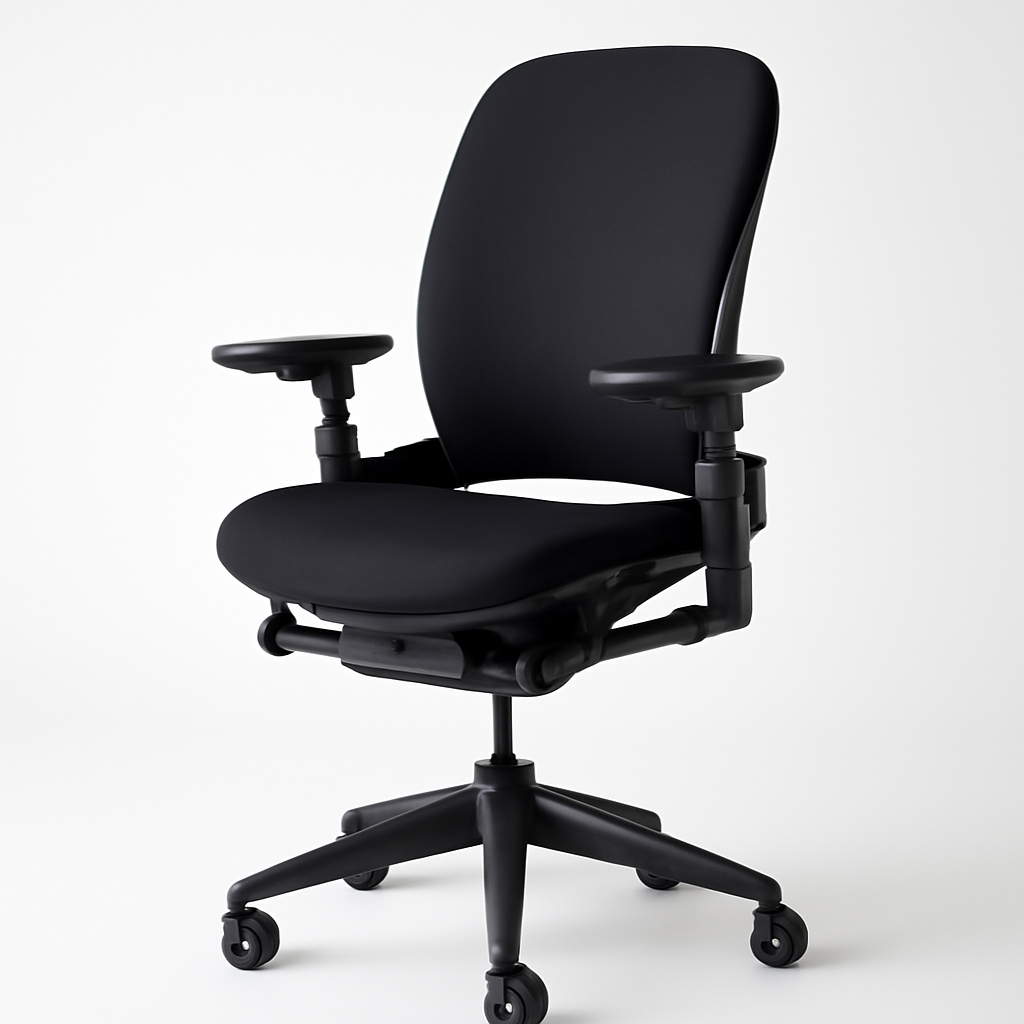
If you’re spending 6-8 hours a day in your desk chair, you need one that actually supports your back, doesn’t feel like you’re sitting on concrete, and won’t fall apart in six months. The best desk chairs on Amazon balance ergonomic support, durability, and price. Our top overall recommendation is the Steelcase Leap CHECK PRICE] for its exceptional lumbar support and adjustability, but if you’re on a tighter budget, the [SIDIZ T50 [CHECK PRICE] delivers 80% of the ergonomic benefits at half the cost.
This guide breaks down everything you need to know to find the right chair for your workspace, body, and budget.
—
What to Look For in a Quality Desk Chair
Before you start scrolling through Amazon’s endless chair options, understand what actually matters:
Lumbar Support
Your lower back bears most of your weight when sitting. A chair without proper lumbar support forces your spine into an unnatural curve, leading to pain by day’s end. Look for chairs with adjustable lumbar support that conforms to your spine’s natural S-curve, not a rigid bump.
Seat Height and Depth
Your feet should rest flat on the floor with knees at 90 degrees. The seat should be long enough to support your thighs without pressing into the back of your knees. Most quality chairs offer pneumatic height adjustment (the gas cylinder mechanism)—avoid cheap hydraulic adjustments that lose pressure within months.
Armrests
Fixed armrests are cheaper but less functional. Look for 3D-adjustable armrests (height, width, and angle) that support your arms at elbow height when your shoulders are relaxed.
Material Quality
Mesh chairs breathe better for long sessions but offer less support than high-density foam. Premium fabric holds up better than cheap polyester that pills and stains. Check customer reviews specifically mentioning durability—a $300 chair that lasts 5 years beats a $150 chair that falls apart in 18 months.
Tilt Mechanism
A good tilt lock lets you recline slightly and rock gently—reducing strain on your back. Budget chairs often lack this or have unreliable mechanisms.
Base and Casters
Heavy-duty five-point bases are standard. Casters should roll smoothly and not scratch hardwood floors. Heavy chairs (40+ lbs) feel more stable than flimsy ones.
—
Best Overall Desk Chair on Amazon
Steelcase Leap [CHECK PRICE]
The Steelcase Leap is the gold standard for home office seating on Amazon. This isn’t a gaming chair covered in racing stripes—it’s what you see in corporate offices and design studios worldwide.
Why it stands out:
– LiveLumbar Technology: The backrest adjusts automatically as you recline, maintaining spinal support at any angle
– 4D arms: Adjust in every direction—height, depth, width, and angle
– Natural Glide tilt: Smooth recline that feels organic, not jerky
– Weight capacity: 300 lbs
– Warranty: 12-year manufacturer warranty
Pros:
– Exceptional long-term comfort (8+ hour workdays feel effortless)
– Holds up to years of heavy use without squeaking or deterioration
– Adjustability is unmatched—you can dial in the perfect fit for your body
– Professional appearance works in any office aesthetic
– The automatic lumbar support actually feels like the chair knows your spine
Cons:
– Price tier is significantly higher than budget alternatives
– Learning curve on all the adjustment options (but worth it)
– Takes up more space than compact gaming chairs
– Heavier than most other chairs (making it harder to move)
Best for: Anyone spending 6+ hours daily at their desk, remote workers, anyone with existing back pain seeking relief.
—
Best Budget-Friendly Office Chair
SIDIZ T50 [CHECK PRICE]
Don’t let the unfamiliar brand name fool you—SIDIZ is a Korean ergonomic furniture company that’s been around for 30+ years. The T50 brings legitimate ergonomic design to the sub-$400 price point.
Key features:
– Adjustable lumbar support with 5-position settings
– Height adjustable armrests
– Breathable mesh back and seat
– 110° recline range
– Weight capacity: 265 lbs
Pros:
– Serious ergonomic features at a fraction of premium-chair cost
– Lightweight (around 30 lbs) compared to heavier competitors
– Mesh material stays cooler during long sessions
– Easy to assemble (takes 20-30 minutes)
– Amazon reviews consistently praise the value-for-money ratio
Cons:
– Build quality is good but not exceptional (casters may be less smooth than Steelcase)
– Less customizable than higher-end options
– Some users report the chair softens slightly after 1-2 years of daily use
– Less recognizable warranty support than major US brands
Best for: Remote workers on a budget, students, anyone wanting real ergonomic support without the $1000+ price tag.
—
Best Ergonomic Chair for All-Day Comfort
Herman Miller Aeron [CHECK PRICE]
The Aeron is arguably the most famous office chair in the world—and for good reason. Designed in 1994, it’s been the default choice for anyone serious about desk ergonomics for three decades.
Standout features:
– PostureFit sacral support (supports your pelvic area)
– 8Z Pellicle suspended seat (doesn’t compress or become uncomfortable)
– Fully adjustable everything: arms, back height, lumbar support, seat tilt
– Sizes XS, S, B, L, XL (not one-size-fits-all)
– Weight capacity: 300 lbs
– 12-year manufacturer warranty
Pros:
– Literally designed to support humans sitting 8+ hours per day
– Suspension mesh never goes flat or becomes lumpy
– Incredibly easy to adjust while seated
– Works well for a wide range of body types (multiple size options)
– Resale value is strong (people want used Aerons)
– Back support prevents slouching without feeling rigid
Cons:
– Premium pricing (though less than Steelcase)
– All-black/gray colorways (limited aesthetics)
– May feel firmer than foam-padded chairs initially
– Many counterfeits on Amazon—buy only from authorized sellers
Best for: Corporate professionals, anyone with chronic back issues, people who will keep the same chair for 10+ years.
—
Best Gaming Desk Chair for Home Offices
Autonomous ErgoChair Pro [CHECK PRICE]
Most gaming chairs prioritize looks over ergonomics (and they often look like race cars). The Autonomous ErgoChair Pro takes gaming chair style but pairs it with actual support for the 8-10 hour workday.
Key specifications:
– 4D adjustable armrests
– Adjustable lumbar and neck support
– Recline up to 135°
– Memory foam seat padding
– Weight capacity: 300 lbs
– Available in Black, Blue, Red, and Gray
Pros:
– Aggressive-looking aesthetic appeals to gamers and modern offices
– Great neck pillow included (not a cheap add-on)
– Good value compared to other gaming-branded chairs
– The recline is smooth and holds position well
– Armrests are genuinely adjustable (not just up/down)
Cons:
– Padding softens noticeably after 6-12 months of daily use
– Customer reviews mention the tilt mechanism getting loose over time
– Lumbar support requires manual adjustment (not automatic like Steelcase)
– Customer service through Amazon is inconsistent
– Warranty coverage less comprehensive than Steelcase/Herman Miller
Best for: Home office workers who also game, younger professionals, anyone wanting gaming aesthetics with office functionality, budget-conscious ergonomic seekers.
—
Best Stylish/Design-Forward Office Chair
Vitra Eames Aluminum Group Chair (Licensed) [CHECK PRICE]
If your workspace is Instagram-worthy and function is secondary to form, the Eames-style chair adds instant sophistication. The licensed versions available on Amazon maintain the iconic design without the $3000+ price tag of authentic Vitra furniture.
Design features:
– Iconic molded fiberglass shell
– Aluminum base (not plastic)
– Multiple upholstery options (leather, fabric, vinyl)
– Modern aesthetic works in design studios, creative agencies, upscale home offices
– Weight capacity: 250 lbs
Pros:
– Instantly recognizable design that photographs well
– Lightweight and easy to move
– Works as a statement piece in any office
– Multiple colorway options available
– Licensed versions maintain good build quality
Cons:
– Limited ergonomic adjustability (height-adjustable base only)
– Padding is minimal—comfort for extended sitting is limited
– Better as an accent chair than daily workspace chair
– Not suitable for anyone with back pain or long workdays
– Premium price for limited function
Best for: Design professionals, office aesthetics prioritized equally with comfort, accent seating in executive offices, people spending 2-4 hours (not 8+) at the desk.
—
Comparison Table: Quick Reference
| Product | Best For | Price Range | Key Differentiator |
| Steelcase Leap | All-day comfort, premium support | $900–$1,200 | LiveLumbar auto-adjusting support |
| SIDIZ T50 | Budget-conscious ergonomics | $250–$400 | Best value for ergonomic features |
| Herman Miller Aeron | Proven long-term reliability | $1,000–$1,400 | Pellicle seat never compresses |
| Autonomous ErgoChair Pro | Gaming aesthetics + ergonomics | $350–$500 | Gamer-appealing design with support |
| Vitra Eames (Licensed) | Design-forward spaces | $500–$800 | Iconic aesthetic over function |
—
How to Measure for the Right Fit
Finding the perfect chair size isn’t guesswork. Use these measurements:
Seat Height
Measure from the floor to the underside of your knee while sitting on a standard chair with feet flat. Your desk chair should land approximately at this height. When adjusted properly, your feet should rest flat on the floor with knees at 90 degrees.
Seat Depth
Measure from the back of your knee to your backside. Your chair’s seat should be 2–4 inches shorter than this measurement so your thighs don’t get compressed at the knee edge.
Backrest Height
The backrest should support your entire back from tailbone to shoulders. If it ends too low, it won’t support your upper back. Too high and it may interfere with your neck/shoulder movement.
Armrest Height
When sitting with shoulders relaxed, your elbows should bend at 90 degrees. Armrests should support your forearms at this exact height. If you’re constantly adjusting your shoulders or hunching, the armrests are wrong.
Reach to Desk
Sit in the chair at your desk. Your elbows should bend at 90 degrees with hands resting on the keyboard. If you’re reaching forward or pulling back, the chair height or desk height needs adjustment.
Pro Tip
Many Amazon sellers offer free returns on chairs—order multiple options and return what doesn’t fit. Your body is unique; no online measurement perfectly predicts comfort.
—
Features Comparison: Top 3 Picks
| Feature | Steelcase Leap | Herman Miller Aeron | SIDIZ T50 |
| Lumbar Support Type | Automatic LiveLumbar | Manual PostureFit | 5-position manual |
| Armrest Adjustability | 4D (full) | 4D (full) | Height & angle |
| Material | Mesh + fabric options | Pellicle mesh | Breathable mesh |
| Recline Range | 30° | 22° | 110° |
| Weight Capacity | 300 lbs | 300 lbs | 265 lbs |
| Assembly Time | 30–45 min | 30–45 min | 20–30 min |
| Warranty | 12 years | 12 years | 5 years |
| Estimated Lifespan | 10+ years | 10+ years | 5–7 years |
—
Common Amazon Chair Mistakes to Avoid
1. Prioritizing Price Over Comfort
A $120 chair “with amazing reviews” usually has reviews from people who’ve only sat in it for a week. Check for reviews mentioning durability after 1+ year of use.
2. Buying Based on Looks Alone
Racing-stripe gaming chairs look cool in unboxing videos but become uncomfortable nightmares during eight-hour workdays. Prioritize function; aesthetics are secondary.
3. Assuming More Padding = More Comfort
Budget chairs often use thick foam that feels soft initially but compresses flat in 3-6 months. Mid-range foam paired with good support beats marshmallow-like cushioning.
4. Ignoring Return Policies
Amazon’s 30-day returns are your friend. Order multiple chairs, keep the one that works, return the others. Don’t guess—test.
5. Overlooking Caster Quality
Cheap plastic wheels damage hardwood floors and catch on carpet. Prioritize smooth-rolling, floor-friendly casters, especially if you’re moving the chair frequently.
6. Not Checking for Authorized Sellers
Counterfeit office chairs (especially Herman Miller and Steelcase) are common on Amazon. Always verify you’re buying from authorized retailers or directly from Amazon.
—
Our Verdict
Your best desk chair depends on three factors: budget, daily hours sitting, and body type.
If you have $900+: Go with the Steelcase Leap [CHECK PRICE]. The LiveLumbar automatic support system is worth every dollar if you’re working 8+ hours daily. This chair will be comfortable 10 years from now.
If you have $400–$700: Choose the SIDIZ T50 [CHECK PRICE] or Herman Miller Aeron [CHECK PRICE] (if you find a sale). Both offer legitimate ergonomic support without Steelcase’s premium pricing. The Aeron edges out for long-term reliability; the T50 wins on value.
If you have $250–$400: The SIDIZ T50 [CHECK PRICE] is your answer. It punches way above its price point with real adjustable lumbar support, not just a foam lump.
If you work 4–6 hours daily: The Autonomous ErgoChair Pro [CHECK PRICE] balances style and support at a mid-range price. You won’t need the obsessive adjustability of premium chairs.
If aesthetics matter equally to comfort: The Vitra Eames (Licensed) [CHECK PRICE] is acceptable for shorter workdays (2–4 hours), but don’t expect Herman Miller Aeron-level support during long sessions.
—
Final Checklist Before Buying
– [ ] Your feet will rest flat on the floor at chair height
– [ ] Armrests support your forearms at 90-degree elbow angle
– [ ] Back rest reaches your full spine (neck to tailbone)
– [ ] Chair is from an authorized Amazon seller (not a third party)
– [ ] You’ve read recent reviews mentioning durability (not just first impressions)
– [ ] Return policy gives you 30+ days to test
– [ ] Weight capacity exceeds your body weight by at least 30 lbs
– [ ] Base is sturdy (5-point, not 4-point)
Your desk chair isn’t an expense—it’s an investment in your posture, productivity, and long-term spinal health. Take the time to get it right.